HelpWire is a free remote desktop and support app for Windows, macOS, and Linux. It offers secure link-based sessions, unattended access, file transfer, multi-monitor support, and team tools for fast, simple remote assistance without recurring fees, easily.
If you're looking for a free remote desktop solution that doesn't compromise on security or usability, HelpWire deserves your attention. It combines remote support, unattended access, file transfer, and cross-platform compatibility into a clean, modern application that's surprisingly easy to use. While it doesn't offer every enterprise feature found in TeamViewer, it's an excellent choice for freelancers, IT technicians, and businesses that want reliable remote support without recurring subscription fees.
TL;DR: Is HelpWire Worth Downloading?
Overall Rating
4.6 / 5
Best For
IT support teams, MSPs, freelancers, small businesses
Not Ideal For
Large enterprises needing advanced compliance or mobile remote support
Imagine a client calls because Outlook refuses to open, or a family member can't figure out why their printer suddenly disappeared. Normally, you'd spend the next ten minutes explaining where to find a connection ID or asking them to read out a long password.
HelpWire takes a different approach.
Instead of juggling IDs and temporary passwords, you simply send the other person a secure connection link. They open it, approve the session, and within moments you're viewing their desktop. The entire process feels designed for people who need help—not just those who are comfortable with technology.
Developed by Electronic Team, Inc., HelpWire is a modern remote desktop and remote support solution built for Windows, macOS, and Linux. Whether you're helping customers, managing office computers, or supporting friends and family, the software focuses on making remote assistance quick, secure, and straightforward.
Unlike many traditional remote desktop tools that try to serve every possible enterprise scenario, HelpWire concentrates on the features most technicians actually use every day:
Remote support sessions
Unattended access
Secure file transfer
Multi-monitor support
Team collaboration
Cross-platform connectivity
That practical approach is one reason many users now compare HelpWire with established names like TeamViewer, AnyDesk, and RustDesk.
Why Trust This Review?
Remote desktop software is difficult to judge from a feature list alone. Nearly every product promises fast connections, military-grade security, and an easy setup. The real difference appears once technicians start using the software in everyday situations.
For this review, we looked beyond the official product page and compared HelpWire's documentation with feedback from verified users on platforms like G2, Capterra, GetApp, and Reddit. Rather than repeating marketing claims, we focused on the experiences people consistently reported after using HelpWire in real support environments.
Across those reviews, several themes kept appearing:
Setup is surprisingly simple.
Commercial use being free is a major advantage.
Connections generally feel fast and stable.
The interface is clean enough for first-time users.
Advanced enterprise management features are still limited compared to older competitors.
Instead of asking whether HelpWire is perfect, we asked a more useful question:
Would we recommend it to someone looking for reliable remote support today?
That's the question this review answers.
Our Hands-on Experience with HelpWire
The first thing that stood out wasn't a flashy feature—it was how little time it took to start helping someone.
Many remote desktop tools still expect users to exchange connection IDs, temporary passwords, or security codes before a session can begin. That's manageable for experienced technicians, but it often confuses people who simply need help fixing a computer.
HelpWire removes much of that friction.
After installing the Operator application, generating a connection link takes only a few clicks. The client opens the link, installs the lightweight application, approves the request, and the remote desktop session starts.
That small workflow improvement makes a surprisingly big difference.
Helping non-technical users feels far less stressful because there's less explaining involved.
During longer support sessions, navigation also feels natural. Switching between multiple monitors, transferring files, chatting with the client, and reconnecting to previously authorized devices all happen from a clean interface that doesn't overwhelm you with unnecessary menus.
Performance naturally depends on both internet connections, but most user reports describe sessions as responsive enough for common support tasks such as:
Installing software
Troubleshooting Windows problems
Updating drivers
Configuring office applications
Managing files
Performing routine maintenance
Several reviewers even mentioned replacing paid remote support tools after discovering that HelpWire covered nearly everything they needed for everyday support work.
It's not designed to replace a complete Remote Monitoring and Management (RMM) platform, but for standard remote assistance, it consistently delivers a smooth experience.
What Are HelpWire's Best Features?
Instead of listing every menu option, let's look at the features that actually improve day-to-day remote support.
Remote Support Sessions
This is where HelpWire shines.
Rather than asking users to read complicated IDs or passwords over the phone, technicians simply generate a secure connection link and send it through email, chat, or messaging apps. Once the client approves the request, the remote session begins.
For first-time users, this dramatically reduces confusion and gets problems solved faster.
Unattended Access
Sometimes the real work starts after everyone leaves the office.
HelpWire lets technicians configure unattended access on supported devices, allowing them to reconnect later without someone sitting in front of the computer. That makes overnight maintenance, software updates, and follow-up troubleshooting much easier.
For IT departments and managed service providers, this is one of the software's most valuable capabilities.
Drag-and-Drop File Transfer
Need to install a driver, send a document, or copy diagnostic logs?
Instead of opening separate file managers, HelpWire allows files to be transferred directly through the remote session using simple drag-and-drop actions.
It's a small feature, but one you'll probably use during almost every support session.
Multi-Monitor Support
Supporting users with two or three displays can quickly become frustrating if your remote desktop software isn't designed for it.
HelpWire lets technicians switch between monitors without interrupting the session, making it much easier to assist graphic designers, financial professionals, developers, and anyone working with multiple screens.
Built-in Technician Chat
Sometimes it's easier to type than talk.
The integrated chat window lets technicians explain instructions, ask questions, or share updates without switching to another messaging application. That keeps the entire support conversation in one place.
Team Collaboration
As businesses grow, remote support often becomes a team effort rather than a one-person job.
HelpWire allows organizations to add multiple technicians, manage shared clients, and work together without charging separate licensing fees for every operator. For small IT teams and MSPs, that flexibility can translate into meaningful cost savings.
Cross-Platform Support
Modern workplaces rarely use a single operating system.
One employee works on Windows, another uses a MacBook, while the development team relies on Linux.
HelpWire handles these mixed environments well by supporting Windows, macOS, and Linux from the same platform. That means technicians don't need different remote desktop applications for different clients, simplifying everyday support while reducing training and deployment time.
How Easy Is HelpWire to Use?
One of the biggest reasons people switch remote desktop software isn't speed—it's simplicity.
If you've ever spent five minutes helping someone find a session ID or convincing them they downloaded the wrong installer, you know how frustrating remote support can become before the real troubleshooting even begins.
HelpWire removes much of that friction.
The technician installs the Operator application, generates a secure session link, and shares it with the client. The client opens the link, installs the lightweight app, approves the connection request, and the session begins. There are no lengthy connection codes or temporary passwords to exchange, making the process much easier for less technical users.
The interface follows the same philosophy. Everything—from active sessions and saved clients to unattended devices—is organized inside a clean dashboard that feels modern without hiding important tools behind unnecessary menus.
New users may need a few minutes to understand the difference between attended and unattended sessions, but after the first connection, the workflow becomes intuitive. Whether you're supporting one computer or dozens of client devices, HelpWire keeps the experience straightforward.
How Does HelpWire Perform?
Remote desktop software is only useful if the connection feels responsive.
Based on official information and consistent feedback from verified users, HelpWire performs well for everyday remote support tasks. Sessions generally connect quickly, mouse movement feels responsive, and image quality remains clear on stable internet connections.
Where HelpWire performs particularly well is during common IT tasks, including:
Installing applications
Troubleshooting Windows issues
Editing system settings
Managing files
Running software updates
Providing technical guidance
Its peer-to-peer-first connection architecture helps reduce unnecessary latency whenever a direct connection is available. If a direct connection can't be established, HelpWire automatically uses secure relay servers to maintain the session.
Like every remote desktop solution, performance still depends on the quality of both internet connections. Slower Wi-Fi networks or unstable mobile hotspots may introduce occasional lag, but reviewers generally agree that these slowdowns aren't unique to HelpWire.
For everyday business support, performance is more than adequate.
Is HelpWire Safe?
Yes. HelpWire uses modern security technologies that meet the expectations of today's remote support software.
When giving someone remote access to your computer, security matters just as much as performance. Fortunately, HelpWire includes multiple layers of protection designed to keep both technicians and clients secure.
Key security features include:
AES-256 encryption to protect data transferred during remote sessions.
TLS/SSL protocols for secure communication.
Permission-based access, ensuring remote sessions begin only after client approval or prior unattended authorization.
Auth0 authentication for secure account management.
AWS-hosted infrastructure that provides reliable and scalable cloud services.
Digitally signed desktop applications verified through DigiCert.
From a privacy perspective, HelpWire doesn't bypass user consent. Remote sessions require authorization unless unattended access has already been configured, giving users full control over who can access their computers.
While no remote desktop software is completely risk-free, HelpWire follows the same security practices trusted by many established commercial solutions.
Is HelpWire Really Free?
One of HelpWire's biggest advantages is also the reason many people discover it in the first place.
Unlike several well-known competitors, HelpWire currently allows both personal and commercial use at no cost.
For freelancers, computer repair shops, and small IT teams, that can mean significant savings over subscription-based remote support software.
At the time of writing, users receive access to core features such as:
Remote support sessions
Unattended access
File transfer
Team collaboration
Cross-platform support
without paying licensing fees.
Electronic Team has indicated that the platform will continue evolving, so organizations planning long-term deployments should keep an eye on future pricing announcements. Even so, the current offering provides exceptional value for businesses looking to reduce software costs without sacrificing essential remote support capabilities.
Who Should Use HelpWire?
HelpWire isn't trying to be everything for everyone. Instead, it focuses on solving everyday remote support problems.
IT Support Teams
Internal help desks can quickly assist employees without asking them to configure complicated remote desktop settings. The simple connection process reduces time spent explaining how to start a session.
Managed Service Providers (MSPs)
MSPs often support dozens—or even hundreds—of client computers every week. Features like unattended access, client management, and multi-platform compatibility make HelpWire well suited to recurring support work.
Freelance Technicians
Independent technicians frequently work with customers who aren't comfortable with technology. Sending a secure connection link instead of explaining connection IDs makes remote support much less stressful for everyone involved.
Small Businesses
Businesses that need occasional remote IT assistance can adopt HelpWire without adding another recurring subscription expense.
Home Users
Whether you're helping parents install software or fixing a friend's computer from another city, HelpWire keeps the connection process simple enough for almost anyone.
HelpWire Download & Platform Support
HelpWire currently supports the three desktop operating systems most businesses use today.
Platform
Available
Recommended
Windows
✅
Excellent
macOS
✅
Excellent
Linux
✅
Very Good
Dedicated download guides, installation tutorials, and system requirement pages are available separately for each operating system, allowing users to follow platform-specific instructions instead of navigating a single generic guide.
HelpWire vs TeamViewer
Both HelpWire and TeamViewer solve the same problem, but they target slightly different audiences.
Feature
HelpWire
TeamViewer
Commercial Use
Free
Paid License
Setup Process
Link-based
ID & Password
File Transfer
✅
✅
Unattended Access
✅
✅
Mobile Apps
❌
✅
Enterprise Features
Basic
Advanced
Choose HelpWire if you're looking for an affordable remote support solution with excellent core features and no commercial licensing costs.
Choose TeamViewer if your organization relies on enterprise integrations, advanced device management, mobile remote support, or compliance-focused tools.
HelpWire vs AnyDesk
AnyDesk has built its reputation around speed and low-latency performance.
HelpWire, meanwhile, focuses on making remote support simpler for technicians and easier for clients.
Feature
HelpWire
AnyDesk
Commercial Use
Free
Paid
Connection Method
Secure Link
Device ID
File Transfer
✅
✅
Unattended Access
✅
✅
Mobile Support
❌
✅
HelpWire vs RustDesk
RustDesk appeals to organizations that want complete control over their infrastructure through self-hosting.
HelpWire takes the opposite approach.
It provides a managed, ready-to-use service that requires almost no setup.
Feature
HelpWire
RustDesk
Open Source
❌
✅
Self Hosting
❌
✅
Managed Infrastructure
✅
Optional
Ease of Setup
Excellent
Moderate
Choose HelpWire if you want to start supporting clients immediately without maintaining servers.
Choose RustDesk if privacy requirements or infrastructure control make self-hosting an important part of your workflow.
What Do Real Users Think About HelpWire?
One of the best ways to judge any remote support software is by listening to the people who use it every day.
Across platforms like G2, Capterra, GetApp, and Reddit, HelpWire has earned consistently positive feedback. While experiences vary depending on internet quality and business needs, several opinions appear repeatedly.
What Users Like
Many technicians say they switched to HelpWire because they wanted a free alternative to TeamViewer without giving up essential features.
The most common praise includes:
Easy setup with secure invitation links
Free commercial use
Fast and stable remote sessions
Clean, modern interface
Reliable file transfer
Helpful customer support
Several reviewers also mention that their clients find HelpWire easier to understand because they don't have to search for connection IDs or temporary passwords before every session.
Common Complaints
No software is perfect.
The most frequent criticisms include:
No mobile apps for remote support
Fewer enterprise management features
Smaller third-party integration ecosystem
Occasional lag on slower internet connections
No built-in session recording
Overall, community sentiment is overwhelmingly positive, particularly among freelancers, computer repair technicians, and small IT support companies.
Where Does HelpWire Fit in a Modern IT Support Workflow?
Remote support isn't just about controlling another computer. It's about solving problems as quickly as possible.
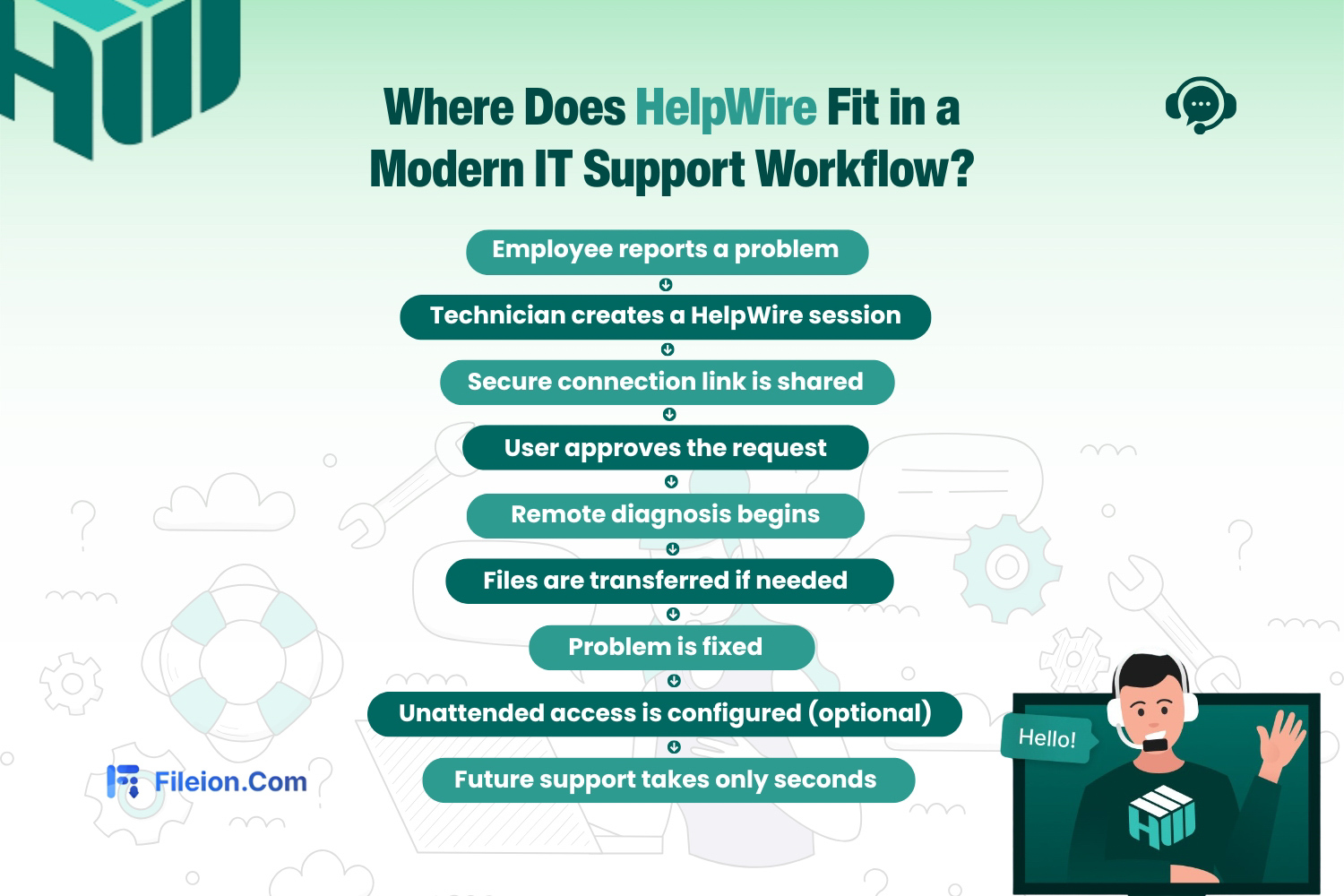
A typical HelpWire support session looks like this:
This workflow explains why many technicians prefer HelpWire for everyday support. Instead of wasting time explaining connection IDs or troubleshooting firewall settings, they can focus on solving the actual problem.
For businesses supporting dozens of users every week, even saving a few minutes per ticket can significantly improve productivity.
Where HelpWire Could Improve
HelpWire already delivers an excellent remote support experience, but there are a few areas where it still trails more mature competitors.
The biggest limitation is the lack of native mobile applications for Android and iPhone, making it difficult for technicians who frequently work away from their desks.
Large enterprises may also miss features such as:
Advanced compliance reporting
Remote printing
Deep Active Directory integration
Enterprise device management
Built-in ticketing integrations
These limitations won't affect most home users or small businesses, but organizations managing thousands of endpoints may find TeamViewer or similar enterprise platforms more suitable.
Who Should Download HelpWire?
We Recommend HelpWire If You...
Provide remote technical support every day.
Run a small IT business or MSP.
Need unattended access for client computers.
Want to replace expensive remote desktop software.
Support Windows, macOS, and Linux devices.
Need reliable commercial remote support without monthly subscription fees.
Consider Another Option If You...
Need mobile remote support.
Require enterprise compliance certifications.
Depend on remote printing.
Need advanced endpoint management and automation.
Final Verdict: Should You Download HelpWire?
After comparing HelpWire with established remote desktop solutions and analyzing feedback from real users, it's easy to see why the software has gained attention so quickly.
Instead of overwhelming users with enterprise-only features, HelpWire focuses on what most technicians actually need: fast remote connections, unattended access, secure file transfers, cross-platform compatibility, and an interface that's easy for both technicians and clients to understand.
Its biggest advantage is simple—it's free for commercial use, something very few remote support platforms can genuinely offer.
It's not the perfect choice for every organization. Businesses requiring advanced compliance tools, mobile remote support, or enterprise endpoint management may still prefer TeamViewer or similar enterprise platforms.
However, for freelancers, managed service providers, internal IT departments, small businesses, and anyone looking for a reliable HelpWire alternative to expensive remote desktop software, HelpWire is one of the best options available today.
Our Rating: 4.6/5
If you're looking for a secure, easy-to-use, and genuinely free remote support solution, HelpWire is well worth trying.
Download the latest version of HelpWire from Fileion to get a safe, verified installer, then explore our Windows, macOS, and Linux installation guides to get started in just a few minutes.
Hi, I’m Ishrat, Junior Content Writer at Fileion. With a strong passion for tech and a background i...
1
Followers
0
Following
Software Content Writer
Hi, I’m Ishrat, Junior Content Writer at Fileion. With a strong passion for tech and a background in SEO, digital content, and web solutions, I craft stories that connect users to the tools they need. At Fileion, I turn complex topics into clear, helpful content, making tech feel simple and accessible for everyone. Let’s write something impactful!
FAQs
Frequently Asked Questions
Yes. HelpWire supports multi-monitor environments. This makes it easier for technicians to work with users who have dual or multiple displays without constantly switching between windows.
Yes, when supported by the operating system and session permissions, HelpWire can reconnect after remote system restarts used during troubleshooting or maintenance. This helps technicians continue support without starting a completely new session
Yes. HelpWire is designed to work in most typical network environments without requiring complex firewall or NAT configuration. This simplifies remote support for both businesses and home users.